views
全流程网上现在已经很多博客介绍了,这里提供一些细节和自己的设置
网站收录
插件设置的 url 里填写博客网址➕appearance 里设置 Main language,以激活 sitemap 让搜索引擎检索并自动激活 rss 功能
网页语言属于 html 头部 <html lang="en" class=" ">,中文应为 zh-cn
访问统计
包含网站浏览量、文章浏览量、文章评论数。
- 采用参考文章里提供的 busuanzi 的 js 脚本
- Waline 提供文章浏览量和文章评论数统计
- netlify 自带的统计:总之就是用添加银行卡(可以用中国银联)➕承担超额风险换取免费的 Site Analytics 功能。
/src/site/_includes/components/user/common/footer/comment.njk
/src/site/_includes/components/user/common/header/analytics_article.njk
代码放在 resources/obsidian-digital-garden
评论系统
采用 Waline,需要自建/免费使用一个 Waline 服务端。从 waline 官方 fork 一个新的仓库就行,和网站仓库的唯一交集就是提供一个 serverURL。
- netlify 部署服务端的更新:进入到 GitHub 仓库中,修改 package.json 文件中的
@waline/vercel版本号为最新版本即可。 - vercel 部署服务端,现在需要验证手机号
/src/site/_includes/components/user/common/footer/comment.njk
代码放在 resources/obsidian-digital-garden
waline 的部分细节(自用。因评论区 editor 输入框右边界超出 panel 外框,同时隐藏邮箱等等)
src/site/styles/user/custom-style.scss

.wl-editor {
  width: calc(100% - 2.1em) !important;
}
.wl-header {
  display: none;
}
waline 隐藏评论者信息。在服务端配置环境变量
- UA
DISABLE_USERAGENT = true - 归属地
DISABLE_REGION = true
目录树索引
之后文章多了考虑每个文件夹下建一个 index.md,隐藏其他文件,但是逻辑很反人类。
未来官方模板应该会更新和修复这些功能:文件夹点击、#自动深色、#feed 报错
网页组件
自动深色
digital garden 主题如果以浅色发布,在诸如 dark reader 插件这种反转深色后,会出现 callout 不可见的问题->设置自动主题切换,添加/修改以下两个文件
src/site/_includes/components/user/common/footer/theme-switch.njk
src/site/styles/user/custom-style.scss
代码放在 resources/obsidian-digital-garden
字体设置
src/site/_includes/components/user/common/head/font.njk

{# 霞骛文楷 LXGW WenKai Screen #}
{# https://api.staticfile.net/libraries?output=human #}
<link rel="stylesheet" href="https://cdn.staticfile.net/lxgw-wenkai-screen-webfont/1.7.0/style.css" />
{# 更纱黑体 Sarasa Gothic SC #}
{# https://fonts.zeoseven.com/items/161 #}
{# <link rel="stylesheet" href="https://fontsapi.zeoseven.com/161/main/result.css" /> #}
{# Noto Sans CJK 思源黑体 SC #}
{# https://fonts.zeoseven.com/items/69/ #}
{# <link rel="stylesheet" href="https://fontsapi.zeoseven.com/69/main/result.css" /> #}
src/site/styles/user/font.scss

body {
--font-default: "LXGW WenKai Screen", sans-serif;
}
/* LXGW WenKai Screen, Sarasa Gothic SC, Consolas */
/* 选择第一个字体:--primary-font */
/* 选择第二个字体:--secondary-font */
(css 不支持区分中英文混合的代码块中的字体,需要借助 js)
方法 1
在 .env 文件的 THEME= 中将需要的字体使用 @font-face 直接写入远程主题文件的 css 中,可以减少网页加载时间,但需要单独导入粗体和斜体,需要单独找到 url。
Code
/* Sarasa Gothic SC */
@font-face {
  font-family: "Sarasa Gothic SC";
  src: url("https://cdn./sarasa-gothic-sc-regular.woff2") format("woff2");
  font-weight: normal;
  font-style: normal;
}

/* LXGW WenKai Screen */
@font-face {
  font-family: "LXGW WenKai Screen";
  src: url("https://cdn./lxgwwenkaiscreen-regular.woff2") format("woff2");
  font-weight: normal;
  font-style: normal;
}
方法 2
远程主题文件的 css 中使用 @import,不推荐,网页加载时间较长
方法 3
通过 font.njk 和 font.scss 加载字体定义,然后在 theme.css 中直接使用字体名称。只需要确保构建流程正确整合这三部分即可
实现的关键在于 theme.css 的样式必须在 font.njk 和 font.scss 的字体定义之后应用(CSS 层叠规则会确保这一点)
代码块样式
语法代码块会出现重影。和字体设置无关,llm 说是渲染的问题,通过以下代码解决
src/site/styles/user/custom-style.scss

/* Code syntax highlighting */
code[class*='language-'], pre[class*='language-'] {
  font-family: var(--font-default) !important;
  /* 禁止css代码块渲染,去除重影 */
  text-shadow: none !important;
  -webkit-text-stroke: 0 !important;
}
/* end Code syntax highlighting */
普通代码块整体灰色设置如下,这会导致行间距非常小。因为它的每一行应该是一个单独的 block,所以行间距有白色
src/site/styles/user/custom-style.scss

/* Code blocks */
/* 以下二者作用相同,下面的优先级更高 */
pre[class*='language-'] {
  display: block !important; /* 恢复代码块为整体 */
  /* line-height: 1.5 !important; */
}
.markdown-rendered pre code {
  display: block !important; /* 恢复代码块为整体 */
  /* line-height: 1.5 !important; */
}
图片居中
src/site/styles/user/custom-style.scss

img {
  display: block;
  margin: 0 auto;
}
嵌入文章
打算以这种方式实现归档页面,也是用 obsidian 两年来第一次注意到 ![[]] 这个语法可以内嵌文章页面。
src/site/styles/user/custom-style.scss

.markdown-embed {
  max-height: 28vh !important;
  overflow: auto !important;
  margin: 0 auto !important;
  display: block !important;
  transform: scale(0.8) !important;
  transform-origin: top center !important;
}
frontmatter
这是我所使用的模板
<%*
let fileName = await tp.system.prompt("请输入笔记名", "新建笔记");
let permalink = await tp.system.prompt("请输入链接标题", "mynote");
await tp.file.rename(fileName)
-%>
---
dg-publish: false
dg-permalink: <% permalink %>
title: <% fileName %>
dg-created: <% tp.date.now("YYYY-MM-DDTHH:mm:ss") %>
---
dg-content-classes: 用于为单篇笔记设置单独的 css,官方建议可以改成很多主题通用的 cssClasses。比如用一个 md 文件放全部的图片,类似 gallery/kanban
dg-pinned: false:按需添加
dg-hide: false:按需添加
tags::目前我不需要
其他自定义的如需反映在网页上,则必须写入 dg-metatags: 内,嵌套属性前空一格。
按需添加:
dg-metatags:
 rss: false
image gallery
会带来性能损失,官方建议采用如 imgur 插件自动图床外链而非本地图片。
方法 1
使用 Modular CSS Layout。如果整个 md 文件作为 gallery ,需要定义 cssClass: image-gallery
目前网页端只能实现 callout 内分列,图片只能使用 ![[]] ,等作者修复吧
src/site/styles/user/custom-style.scss

.markdown-source-view. .cm-embed-block
# GitHub提交错误,这里是作者的bug,多了一个.,改为以下
.markdown-source-view .cm-embed-block
方法 2
从各个主题中提取 css 片段
SCSS/Theme Rewrite/custom-css/callouts/_callout-type-cards.scss
- Cards - Minimal Documentation
- Snippet so you can use Dataview Cards from Minimal theme in any theme
- kepano/obsidian-minimal
- Image Gallery in Obsidian Publish (how to?)
隐藏文件夹
如果一个文件夹内所有的文件都设置 dg-hide: false,这个文件夹在网页 file tree 上仍然可见。使用这个方法解决。
# 注意:这两处的文件可能会随digital garden模板更新而需重新修改
src/helpers/filetreeUtils.js - assignNested
src/site/_includes/components/filetree.njk - menuItem
feed 报错
打开 /feed.xml 时会有一个 mismatch 的报错,解决办法是将下面三行代码中的 / 从 4 个修改为 5 个,参考 Atom/RSS feed error · Issue #493
# 注意:文件可能会随digital garden模板更新而需重新修改
src/site/feed.njk

<link href="{{ meta.siteBaseUrl }}{{ permalink }}" rel="self" /////>
<link href="{{ meta.siteBaseUrl }}" /////>
<link href="{{ meta.siteBaseUrl }}{{note.url | url }}" /////>
feed 排除文件
方法 0
digital garden v1.81.0:
- feat: dg-hide hides everywhere (search, graph, backlinks, feed, sitemap) by @oleeskild in #381
方法 1
设置了 rss: false 的,不加入 feed;未声明 metatags / metatags.rss 的,默认视为 true。
# 注意:文件可能会随digital garden模板更新而需重新修改
src/site/feed.njk

{%- for note in collections.note | reverse %}
  {%- if not note.data.metatags or note.data.metatags.rss != false %}  {# 添加此行 #}
     ...
     </entry>
  {%- endif %}  {# 添加此行 #}
{%- endfor %}
方法 2
不推荐。.eleventy.js 中排除,意味着彻底从 Eleventy 构建流程中剔除这些文件,即不会出现在目录树中
# 注意:文件可能会随digital garden模板更新而需重新修改
.eleventy.js
# 放在tags: ["h1", "h2", "h3", "h4", "h5", "h6"]之后,接下来的配置eleventyConfig.addFilter("dateToZulu", function (date)之前。

// 添加 note 集合,排除特定文件
eleventyConfig.addCollection("note", function (collectionApi) {
  const excludeFiles = new Set([
    "z's blog.md",
    "介绍.md"
  ]);
  return collectionApi
    .getFilteredByGlob("src/site/notes/**/*.md")
    .filter(item => {
      const path = require("path");
      const baseName = path.basename(item.inputPath);
      return !excludeFiles.has(baseName);
    });
});
合并 commit
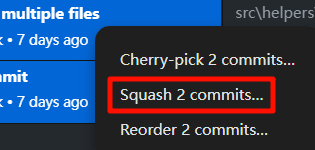
强迫症选项。网页端修改文件会造成很多零碎的 commit,借用 GitHub Desktop 合并,登录拉取远程仓库,在 history 里合并后,force push 即可。
一些未解决的问题
- Headings from embeds are added to TOC · Issue #534
- How to exclude /404 page URL from generated sitemap.xml? · Issue #658: 同理,排除某些文章不进入 feed
digital garden 更新
插件内显示的可能是个坑,只要这个页面的 release 没有更新,则无需更新。更新会覆盖一些修改了模板的配置,需要重新改回去。
在使用插件里的 update site 之前,必须先更新 digital 插件
digital garden 主题
Red Graphite 的 san serif 字体更好看,也是推荐用于 mac 的主题
关于 netlify
Changing github repo on existing project
关于 pricing plan
pricing plan 的变更
Previous Starter Plan
- Didn't ask for payment details upfront
- Would stay online and incur overages charges when limits were exceeded
- You would enter payment details once you incurred a debt to Netlify
- If you did not settle your debt Netlify would suspend your account
New Free Plan
- Doesn't require payment details
- Becomes disabled instead of incurring overages and thus won't ever incur a debt
New Starter Plan
- Same as the previous 'Starter'
- Will stay online and incur overage charges if limits are exceeded
- Now requires payment details
参考
👍 官方 help
- 官方文档,官方GitHub
- Tips and Tricks,Adding comments,Adding vercel analytics
- 自行部署在 Netlify
- How do I preview the theme?,How can I implement a light and dark mode switcher into the obsidian Digital garden plugin website?,Enable switch between light and dark mode on site pages,ekliao/EricLiaoDigitalGarden
🔥 Digital Garden + Github + Netlify/vercel/Cloudflare Pages/国内阿里云等方式
- 利用obsidian构建个人博客
- Hi , Obsidian Digital Garden
- Obisidian发布数字花园:沉淀个人知识库
- Obsidian 最简单的发布分享方式
- 用Obsidian digital garden插件发布笔记
- Obsidian 免费建站发布网页
- 人人都可以构建的 属于自己的独立网站
Flowershow + vercel 方式
Github Publisher + vercel 方式
Quartz 4 方式
- 如果你想要一个简单、开箱即用的解决方案,且不介意功能相对基础,Digital Garden 插件是更好的选择。
- 如果你需要高度自定义、强大的功能,并且不怕花时间学习和配置,Quartz 4会更适合你。